 BlurData
Pseudonymize · Built into BlurData for Mac
Anonymize documents before you hand them to AI
BlurData replaces every name, address, amount and identifier with a consistent label such as [PERSON_1], keeps the document readable, and never uploads anything. Ask ChatGPT or Claude about the case, then read the answer back with a key that stays on your Mac.
- Made in Europe
- 100% offline
- 14-day money-back guarantee
your policy of £250,000 for Eleanor Whitfield, 14 Acacia Avenue, is arranged by Thomas Reeve.
your policy of [AMOUNT_1] for [PERSON_1], [ADDRESS_1], is arranged by [PERSON_2].
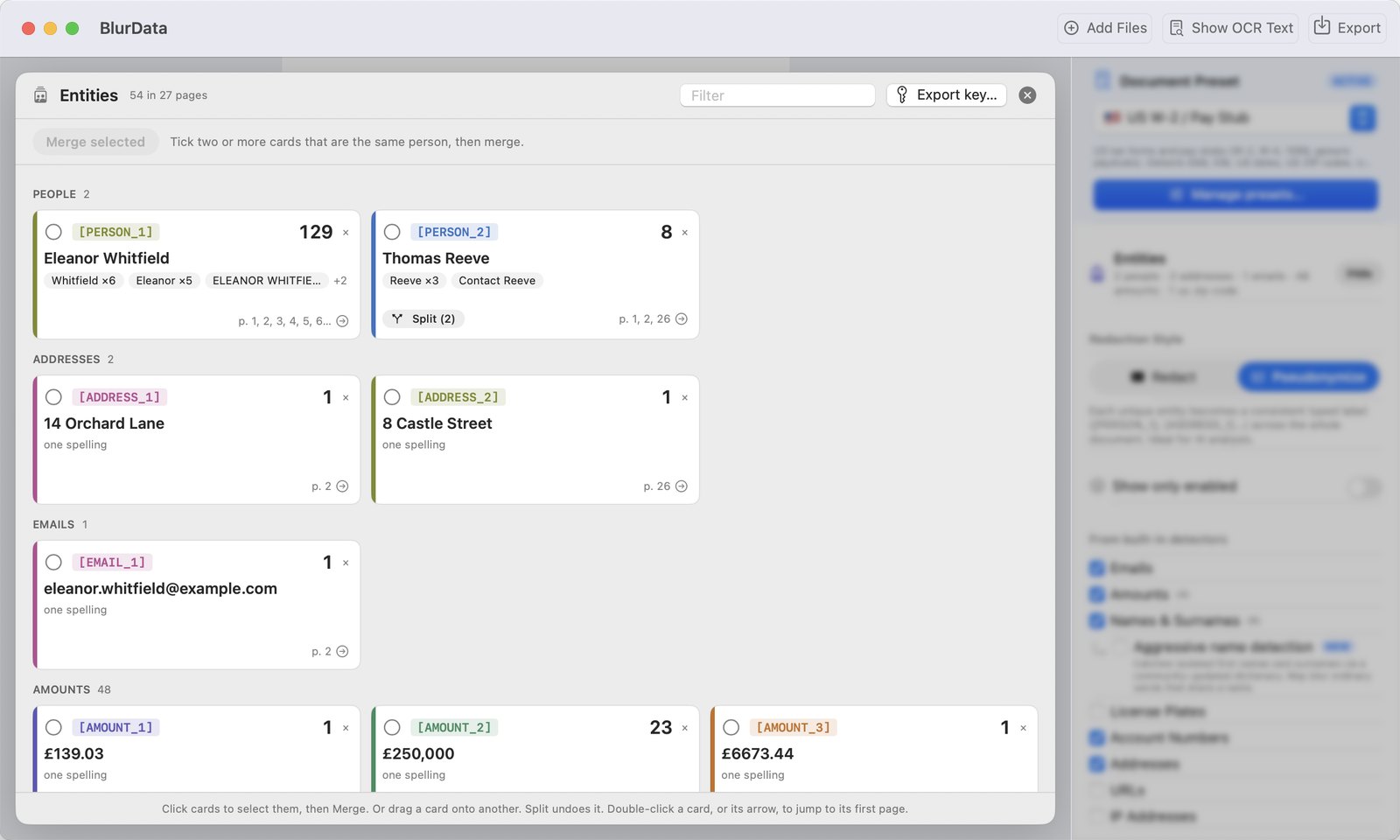
The Entities map opens when the scan ends: one card per entity, with its label, spellings, count and pages.
Redaction hides. Pseudonymization keeps the meaning.
![A quotation page in BlurData with the same person labeled [PERSON_1] in five places and each amount labeled [AMOUNT_1] to [AMOUNT_4]](assets/images/blurdata-pseudonymize-labels-page.webp)
A black box protects a document you are going to publish. It is the wrong tool for a document you want an AI to understand: once every name is a box, the model can no longer tell the policyholder from the adviser, or the first payment from the third. Pseudonymization swaps each identity for a label that stays the same everywhere, so the structure of the case survives while the personal data is gone.
One label per entity, across the whole document
BlurData links the occurrences that belong together: the full name on page 1, the surname alone on page 12, the OCR misread on a scanned page. All of them become the same [PERSON_1], on every page and in every file you loaded.
A map you can correct in seconds
The Entities map lists every person, amount, address and identifier with its spellings and pages. Tick two cards and merge them, split a wrong merge, drop what should stay visible. Human review is part of the workflow, not an afterthought.
The key stays with you
Export a CSV that maps each label back to the original value. Use it to read the AI's answer, and keep it apart from the document. Don't export it, and the transformation is irreversible.
How to anonymize a document for AI with BlurData
Drop the document and switch to Pseudonymize
PDFs, scans, photos or screenshots, one file or a whole folder. Choose the Pseudonymize style next to the redaction colors. Detection runs on your Mac; nothing is uploaded.
Review the Entities map
When the scan ends, the map shows every entity found. Merge cards that are the same person, split a wrong merge, remove what should stay, and draw a manual box on anything the detectors missed. The preview updates as you go.
Export the pseudonymized copy, and the key if you want it
Export writes a new PDF or images with the labels in place; the original document's metadata is not carried over. "Export key" saves the CSV with label, original value, spellings and pages. Send the copy to the AI, keep the key.
What gets replaced
Every category gets its own label prefix, so the AI still knows what kind of thing it is looking at.
Built in
Names and surnames (linked across the document), emails, addresses, monetary amounts, account numbers and IBANs, license plates, IP addresses, URLs.
Country and document presets
US W-2 and pay stubs (SSN, EIN), German payslips (Steuer-ID), Italian busta paga (Codice Fiscale), invoices, bank statements, court documents, and new presets every week from the open library.
Your own identifiers
Case numbers, client IDs, policy numbers, ticket references: add a regex pattern and it becomes a labeled entity like everything else. Or ask us for a preset and we write it within 24 hours, free.
Pseudonymisation under GDPR, done on your Mac
BlurData's key file is that "additional information". It is created only if you export it, it lives where you put it, and it never travels with the document. Everything else, from OCR to the final export, runs on the Mac in front of you: no cloud service processes your clients' data on the way to the AI.
BlurData vs other ways to anonymize documents for AI
| Approach | Runs offline | Consistent labels | Human review | Key you control | Scans & images |
|---|---|---|---|---|---|
| BlurData | ✅ everything on-device | ✅ across pages and files | ✅ Entities map | ✅ CSV, exported only if you want | ✅ on-device OCR |
| Cloud anonymization services | ❌ documents are uploaded | ✅ | varies | held by the service | varies |
| Redaction in Acrobat or Preview | ✅ / cloud AI features | ❌ black boxes lose the meaning | manual | ❌ | ✅ |
| Find and replace by hand | ✅ | ❌ one missed spelling leaks | manual | ❌ | ❌ |
Who anonymizes documents with BlurData before using AI
Law firms
Case files, judgments, contracts and correspondence summarized or drafted with AI without a client's name ever leaving the office. Parties, witnesses and counsel keep distinct labels, so the analysis still makes sense.
Insurance and finance
Quotes, policies and statements where the figures must stay intact and the identities must go. Amounts keep their own labels, so a 30-page quote can still be checked by an AI.
HR and consultants
CVs, performance reviews, client reports and due-diligence files prepared for AI review or shared with an external model, with the people in them pseudonymized.
Healthcare and research
Records and reports analyzed on-device first, so what reaches a model contains labels instead of patients.
Anyone with a document archive
Load a folder, export one pseudonymized copy per document into the folder your document manager indexes, and the clean copies show up in your archive on their own.
Still need a black box?
Redact and Pseudonymize are two styles of the same app. Switch to Redact for anything you publish or share, and the data is permanently removed instead of labeled.
Frequently asked questions
Is this pseudonymisation in the GDPR sense?
Yes. GDPR Article 4(5) defines pseudonymisation as processing personal data so that it can no longer be attributed to a person without additional information that is kept separately. BlurData replaces identifiers with labels such as [PERSON_1] and keeps the mapping in a separate key file that only you hold. If you never export the key, the transformation is irreversible.
Does anything leave my Mac?
No. Detection, OCR, pseudonymization and export all run on your Mac. There is no cloud upload, no API call and no telemetry. The only thing that leaves your Mac is the copy you decide to send to an AI, and it contains labels instead of personal data.
Does it work on scanned pages, photos and screenshots?
Yes. Every page goes through on-device OCR, so scanned PDFs, photographed pages and screenshots are handled the same way as digital PDFs. When a PDF has a text layer, BlurData uses it as well for precise positions.
Can I anonymize a Word document (DOCX) for AI?
Yes, by way of PDF. BlurData opens PDFs and images, so save the Word file as a PDF first (in Word, File > Save As > PDF; in Pages, File > Export To > PDF), then drop the PDF in. Every page is pseudonymized on your Mac and you export a clean copy for ChatGPT or Claude.
Can I keep the same labels across several documents of one case?
Yes. Load the documents together and the labels are assigned across all of them: [PERSON_1] is the same person in the contract, the statement and the correspondence.
What if BlurData links two different people, or misses one?
The Entities map shows every entity with its spellings, count and pages. Select two cards and merge them if they are the same person, split a wrong merge, remove an entity, or draw a manual box on anything the detectors missed.
What is in the key file?
A CSV with one row per entity: the label, the category, the original value, the other spellings found, how many times it appears and on which pages. Keep it apart from the pseudonymized document.
Can I still redact with black boxes?
Yes. Redact and Pseudonymize are two styles of the same app. Redact permanently removes the data for sharing or publishing; Pseudonymize keeps the document readable for analysis.
Can I export the anonymized document as Markdown for ChatGPT or Claude?
Yes. In Pseudonymize, choose Export, then Save as Markdown (for AI). You get a clean .md text file with the same labels as the PDF ([PERSON_1], [IBAN_1] and so on), with headings and simple tables kept, ready to paste into ChatGPT, Claude or any AI. Complex layouts become plain lines, so give it a quick look before you rely on it.