 BlurData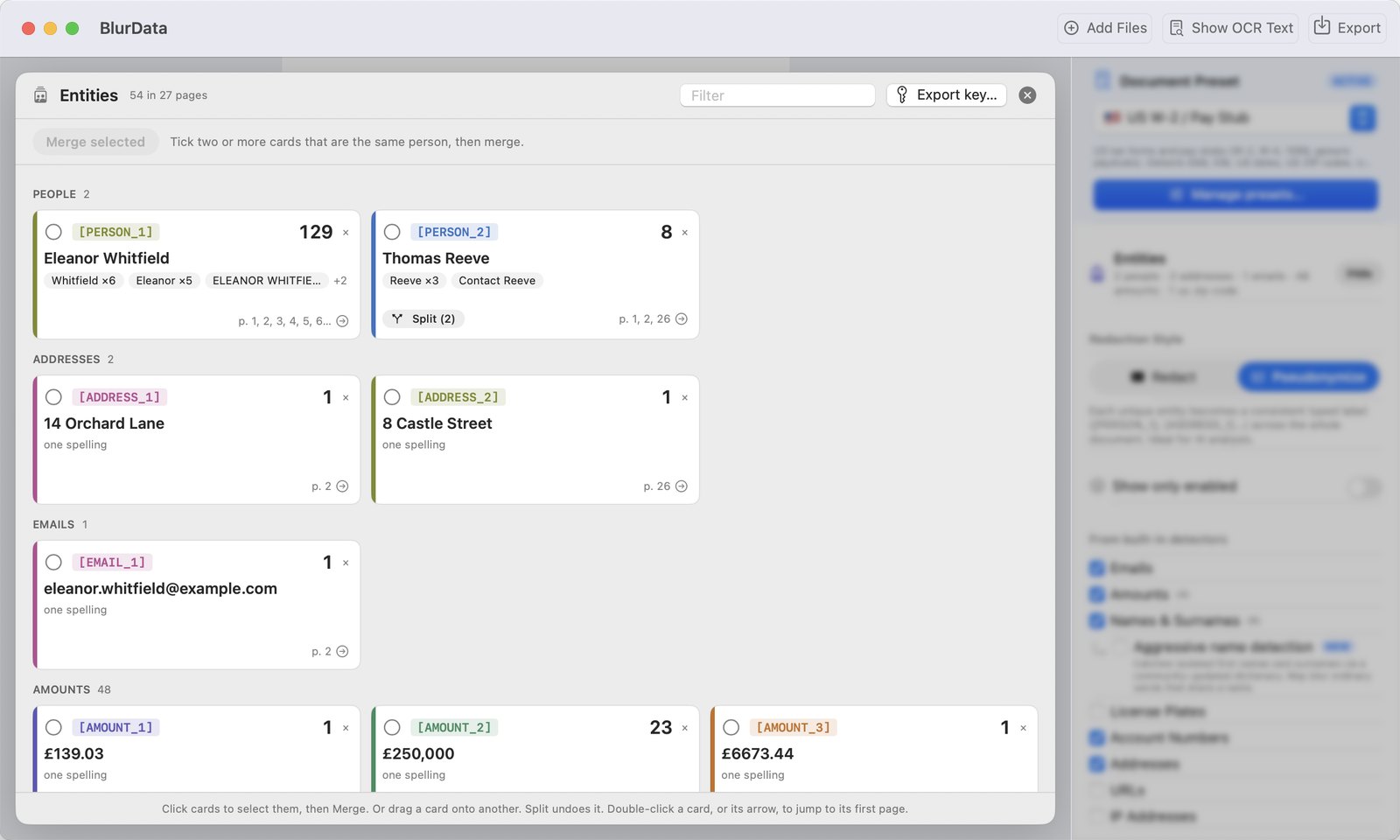
You want to ask an AI about a contract, a medical report, a client file or a 40-page insurance quote. You cannot paste it as it is: names, addresses, account numbers and amounts would leave your machine and land on someone else's server. Redacting them with black boxes does not work either, because the model then cannot tell who is who or which figure is which.
The answer is anonymization that keeps the meaning: every person becomes a consistent label such as [PERSON_1], every amount an [AMOUNT_n], and the document stays readable. Lawyers call it pseudonymisation; GDPR defines it in Article 4(5). A small crop of tools now does exactly this for documents. We compared five of them.
We build one of them, BlurData, so read the ranking with that in mind. Prices and features are what each vendor published at the time of writing, September 2026; prices rechecked in October 2026.
Short version. On a Mac, for documents you review by hand before they go to an AI: BlurData. For a team that wants chat and anonymization in one cloud workspace: anymize.ai. For an organization that needs team review and approvals: Cleardox. For developers building their own pipeline: Presidio. For a quick prompt, not a document: Caviard.
What matters when the output goes to an AI
- Where it runs. If the tool itself is a cloud service, your document is uploaded before it is anonymized. That may be fine with a data processing agreement, and useless without one.
- Consistent labels. "John Smith" on page 1, "Smith" on page 12 and "J. Smith" in the footer must all become the same label, otherwise the AI sees three people.
- Human review. Automatic detection misses things and merges things. You need to see what was found and fix it before export, not after the AI has answered.
- The key. A mapping from labels back to the original values, kept separately, lets you read the AI's answer. Who holds it decides whether the process is reversible and by whom.
- Scans and images. Many real documents are scanned. Without OCR, nothing in them gets detected.
1. BlurData
Best for: reviewing a document on your Mac before it goes to an AI, fully offline.
BlurData is a native macOS app for redaction and pseudonymization. Drop a PDF, a scan or a folder; it detects names, emails, addresses, amounts, account numbers, IBANs, plates, IPs and URLs, plus country presets (SSN and EIN, Steuer-ID, Codice Fiscale, invoices, bank statements, court documents) and your own regex patterns. In Pseudonymize style every entity gets a typed label, and names are linked across the whole document: the surname alone, the OCR misread and the full name all resolve to one [PERSON_n].
The part that sets it apart is the Entities map that opens at the end of the scan: one card per entity with its spellings, count and pages. Tick two cards and merge them, split a wrong merge, drop what should stay visible. Export writes a new PDF or images, and "Export key" saves a CSV that maps each label to the original value. Nothing is uploaded at any point.
- Runs: on the Mac, offline. OCR on every page, so scans and screenshots work.
- Price: $79 per year, $149 lifetime, team licenses for 5 Macs. 14-day money-back guarantee.
- Limits: Mac only. Multi-line addresses are still detected line by line, so check them in the map. No API or Shortcuts action yet.
2. anymize.ai
Best for: teams that want anonymization and the AI chat in one GDPR-oriented workspace.
anymize is a German cloud workspace: you upload the document, it is anonymized, and the anonymized text is sent to GPT, Claude, Gemini or Mistral from inside the same interface, with the answer de-anonymized on the way back. It targets law firms and companies that want GDPR-compliant AI usage without setting anything up. Plans start at €20 per month (450,000 credits, roughly 600 pages), Professional at €49 per month, with a free trial.
- Runs: in the cloud, EU-hosted.
- Price: from €20 per month for a single user, VAT included (as of October 2026).
- Limits: the document is uploaded to anymize before anonymization, so you rely on their processing agreement. Per-credit pricing on heavy use.
3. Cleardox
Best for: legal and public-sector teams that need redaction and pseudonymisation at volume, with approval workflows.
Cleardox, from Denmark, detects personal data in PDFs and lets you choose between black redaction and pseudonymisation, with team review and approval and a fully automated module for thousands of documents. It is team software: the published prices start from €200 per month for one seat (the vendor calls them examples), with a 14-day trial (as of October 2026).
- Runs: a hosted instance for each customer; check deployment options with the vendor.
- Price: from €200 per month.
- Limits: team-oriented pricing and onboarding.
4. Presidio
Best for: developers building their own anonymization pipeline.
Presidio is an open-source library (MIT license) for detecting and anonymizing personal data in text and images. It started at Microsoft and is now a community-owned project. It is free, well documented and used inside many of the products above. It is not an app: you need Python, a place to run it and someone to tune the recognizers for your documents and languages.
- Runs: wherever you deploy it.
- Price: free, open source.
- Limits: engineering time; no review interface, no PDF handling out of the box.
5. Caviard.ai
Best for: a prompt, not a document.
Caviard is a Chrome extension that masks names, emails, phone numbers and IDs in a ChatGPT or DeepSeek prompt before it is sent; the masking happens in your browser. Handy for a paragraph you are about to paste; not built for PDFs, scans or long files.
- Runs: in the browser (Chrome), on ChatGPT and DeepSeek.
- Price: free for up to 10 values per document; lifetime license $9 per device (as of October 2026).
- Limits: prompts only.
Comparison table
| Tool | Runs | Consistent labels | Review before export | Key you control | Price |
|---|---|---|---|---|---|
| BlurData | Mac, offline | Yes, linked across pages and files | Yes, Entities map | Yes, CSV | $79/yr, $149 lifetime |
| anymize.ai | Cloud (EU) | Yes | Yes | Held by the service | From €20/mo, 1 user |
| Cleardox | Hosted instance | Yes | Yes, approvals | Depends on deployment | From €200/mo |
| Presidio | Wherever you deploy it | You implement it | No | You implement it | Free, open source |
| Caviard | Browser | Per prompt | No | No | Free; $9 lifetime |
How to choose
- You are one person or a small office on Macs, and you read every document anyway. BlurData: the review step is built in, the key stays with you, and nothing leaves the machine.
- Your team lives in a chat interface and is fine with an EU cloud processor. anymize.ai.
- You are buying for an organization. Cleardox, and get the processing agreement in writing.
- You have developers. Presidio, and budget the time.
Whichever you pick, keep two habits: look at what was detected before exporting, and keep the key apart from the document you send. The second is what makes the difference between pseudonymised data and personal data with extra steps.